
About Castle Blade Masters
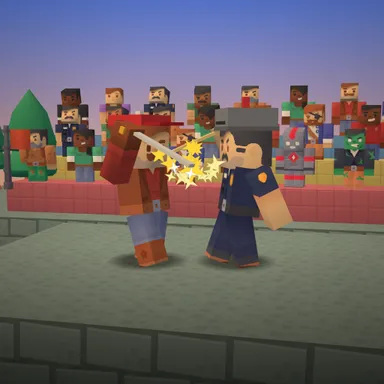
Castle Blade Masters moves the duel to a sunset courtyard with stone floors, red brick walls and a cheering crowd on the ramparts. Two blocky fighters meet in five rounds built around steel and arrows. In Blade Bash you circle between low pillars, time your swing and land four hits before your rival does; a long blade gives you extra reach, but a swing that misses leaves you open, and two blades meeting at the same moment clang apart. In Arrow Showdown you stand on a stone ledge across a gap, aim up or down, hold the key to draw the bow and let go: a light wind drifts the shot, headshots count double, and a lucky step sideways can dodge an arrow. A calm sumo bout on a solid stone ring, with no shrinking floor, keeps the tournament honest. Every hit knocks the target back with a burst of stars, and the final blow slows down for a moment of glory. Play against the AI on Easy, Normal or Pro, or hand the second keyboard half to a friend: Player 1 uses W A S D and F, Player 2 uses the arrow keys and L, and touch screens are split into two halves. Play online too: quick match or invite a friend, and the AI covers anyone who drops.
How to play
Two fighters, one screen. Player 1 (Noob, blue): W A S D + F. Player 2 (Pro, red): arrow keys + L. Alone, pick 1 Player (W A S D or arrows, F or Space). Blade Bash: face your rival and press the action key to swing; hits drain hearts. Arrow Showdown: up and down aim, hold the action key to draw, release to shoot. Sumo Shove: the action key shoves. On a phone, 1 Player has a stick and a button; in 2 Players each half of the screen is one player. Win rounds for stars and the podium. Online: you play one fighter, Noob or Pro, with either key set, the mouse (drag to move, right-click to act) or the touch stick; the AI covers anyone who leaves.
Controls
| WASDF | Move |
| ←↑↓→L | Move |
📺 Play on a TV or projector
- Laptop or PC: connect it to the TV or projector with an HDMI cable (or cast the Chrome tab / mirror your screen), then press the fullscreen button.
- Android TV, Google TV or a TV box: open this site in a browser app on the TV (any Chromium-based TV browser works) and pick a game with the remote's arrows and OK.
- Gamepad: pair a Bluetooth controller (Xbox, PlayStation or a generic one) or plug in a USB one. Stick or D-pad moves, Ⓐ/✕ jumps and selects, Start pauses, View/Select switches fullscreen. In point-and-click games the right stick moves a pointer and RT clicks.
- Phone or tablet: mirror or cast your screen to the TV, or open the site in the TV's own browser.
Difficulty: ★★★☆☆ · Released: 2026-10-08