
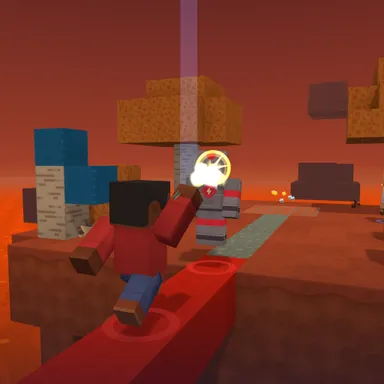
About Ember Bed Rumble
Ember Bed Rumble is a two-against-two island war over a bubbling sea of lava. Choose your fighter from 17 blocky heroes before the match. You can also go online: hit Quick Match, open a room or invite a friend, and CPU fighters fill every empty seat. You and a loyal bot buddy share one red-sand island, one generator, one shopkeeper and, most importantly, one bed. Across the glowing gap, another pair of blocky fighters guards a bed of their own. Generators run hot here, so iron and gold pile up fast and fireballs are always within reach: every fighter starts with one, and a well-aimed throw blasts wool bridges apart and sends enemies tumbling toward the lava. Your team-mate collects, shops, defends and rushes on their own, so you can decide whether to guard the base together or split up and attack from two sides. Build a bridge across the ember sea, punch through the shield of wool and planks around the enemy bed, and knock both rivals out for good. Falling into the lava burns you straight back to your spawn, as long as your bed survives. Thirty matches ramp up the rival duo from clumsy beginners to sharp, fast raiders, and the lava sea keeps changing: a giant diamond island with glittering terraces, a lantern-lit night over the lava and long marathon bridges that hop across stepping-stone rocks. A three-star win means victory, a bed still standing and a quick finish.
How to play
Move with WASD, the arrow keys or the touch stick, Space (▲ on touch) jumps. Hold right-click, Ctrl+click, Shift or K (▦ on touch) while walking to bridge over the lava; on touch, pushing the stick off an edge with wool bridges by itself. Left-click or hold J (⚔ on touch) to fight and mine. F throws a fireball, E eats a golden apple (tap those hotbar slots on touch). Buy gear at the shopkeeper with 1–9, a click or a tap. Pick one of 17 heroes before a match; for online play, use Quick Match, a room or a friend invite.
Controls
| W A S D | Move |
| JMouse | Hit |
| ShiftKRMB | Build |
| Space | Jump |
| F | Throw |
📺 Play on a TV or projector
- Laptop or PC: connect it to the TV or projector with an HDMI cable (or cast the Chrome tab / mirror your screen), then press the fullscreen button.
- Android TV, Google TV or a TV box: open this site in a browser app on the TV (any Chromium-based TV browser works) and pick a game with the remote's arrows and OK.
- Gamepad: pair a Bluetooth controller (Xbox, PlayStation or a generic one) or plug in a USB one. Stick or D-pad moves, Ⓐ/✕ jumps and selects, Start pauses, View/Select switches fullscreen. In point-and-click games the right stick moves a pointer and RT clicks.
- Phone or tablet: mirror or cast your screen to the TV, or open the site in the TV's own browser.
Difficulty: ★★★☆☆ · Released: 2026-10-08