
About Carrot Patch Defense
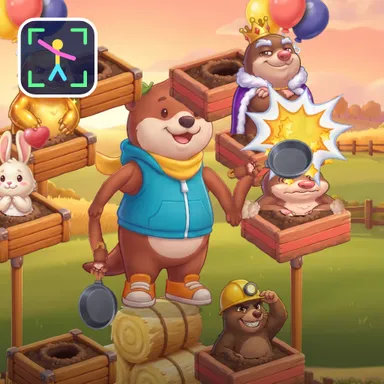
Carrot Patch Defense takes the mole chase to a farm at sunset, where five fat carrots grow right at your feet and a gang of hungry moles wants every one of them. You stand in the field as Pip the otter on a stack of hay bales, a toy mallet in each paw, and the camera turns your real arms into the mallets, mirrored like a selfie. Burrows in wooden planter boxes, on posts and on balloons, surround you within arm's reach. Whenever a mole pops up you have a moment to bonk it before it ducks back down, and every mole that gets away grabs a carrot from the patch. Run out of carrots and the farm is lost, so the game is about never letting one escape. There is no clock: the waves just keep coming, a little faster and a little busier each time. Golden moles give a carrot back, helmet moles need two bonks, bunnies are friends you must not bonk, moles on balloons above you want a jump and the low ones a squat. Every fourth wave the King Mole storms in and hops between the holes, and if you cannot beat him before his wave ends he runs off with two carrots. How many waves can you survive? Your best is saved, stars unlock new mallets and the weekly board shows the top farmers. Two kids can defend side by side on one camera or online, and the last gardener with carrots wins. Only your movements are used and the picture never leaves your device. Keyboard, gamepad, TV remote and tapping also work.
How to play
Choose Play with my body and stand two to three metres from the camera with your whole body in the picture. Hold still for a second, then bonk every mole that pops up before it hides again: each one that escapes steals a carrot. Jump for the balloon moles, squat for the low ones, give helmet moles two bonks and never bonk the bunnies. Golden moles give a carrot back. Keys: 1, Q, A, Z for the left blocks, 0, O, L, M for the right ones, arrows and Enter, or tap the moles. Online: Quick Match, Create room or Invite.
Controls
| 1QAZ | Hit |
| 0OLM | Hit |
| Arrow keys | Move |
| EnterSpace | Hit |
📺 Play on a TV or projector
- Laptop or PC: connect it to the TV or projector with an HDMI cable (or cast the Chrome tab / mirror your screen), then press the fullscreen button.
- Android TV, Google TV or a TV box: open this site in a browser app on the TV (any Chromium-based TV browser works) and pick a game with the remote's arrows and OK.
- Gamepad: pair a Bluetooth controller (Xbox, PlayStation or a generic one) or plug in a USB one. Stick or D-pad moves, Ⓐ/✕ jumps and selects, Start pauses, View/Select switches fullscreen. In point-and-click games the right stick moves a pointer and RT clicks.
- Phone or tablet: mirror or cast your screen to the TV, or open the site in the TV's own browser.
Difficulty: ★★☆☆☆ · Released: 2026-10-13