
About Winter Brawl Party
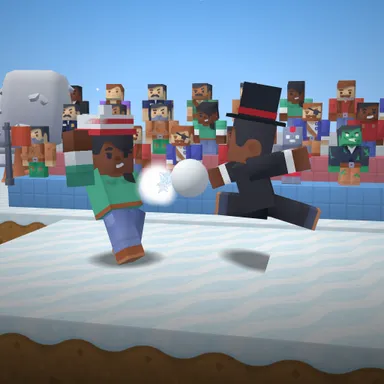
Winter Brawl Party is a cosy snowy tournament where the floor is slippery and the fights are loud. A Noob in a woolly beanie faces a Pro in a top hat across six frosty rounds. Two of them are Snowball Smash: each fighter holds half of a snow field with ice-block forts, scoops up snow from a pile to reload, and lobs balls at the rival, bending the throw up or down with the keys; behind a fort you are safe, but an empty hand means a dash to the pile. The ice changes everything else too. Sumo Shove becomes a slide where a shove sends a fighter gliding to the edge, the sprint along Block Hop Dash crosses slippery ice blocks, the Lava Floor turns into a cracking pond that swallows tiles, and Tower Rush asks you to stack ice blocks on swaying sliders for a perfect, shiny tower. Snow falls softly through every round, the crowd cheers from wooden stands, and a finishing hit freezes in slow motion. Choose one player against an AI in Easy, Normal or Pro, or play two on one screen with W A S D plus F and the arrows plus L; on phones, each player uses one half of the display. Play online too: quick match or invite a friend, and the AI covers anyone who drops.
How to play
Player 1 (Noob, blue): W A S D + F. Player 2 (Pro, red): arrow keys + L. Alone, pick 1 Player (W A S D or arrows, F or Space). Snowball Smash: stay on your half, press the action key to throw (hold up or down to bend it) and stand on your snow pile to reload. Sumo Shove: the action key shoves, the ice is slippery. Block Hop Dash: right sprints, left brakes, up or the action key jumps. Tower Rush: the action key drops the sliding block. Phones: a stick and a button; in 2 Players each half is one player. Most stars wins. Online: you play one fighter, Noob or Pro, with either key set, the mouse (drag to move, right-click to act) or the touch stick; the AI covers anyone who leaves.
Controls
| WASDF | Move |
| ←↑↓→L | Move |
📺 Play on a TV or projector
- Laptop or PC: connect it to the TV or projector with an HDMI cable (or cast the Chrome tab / mirror your screen), then press the fullscreen button.
- Android TV, Google TV or a TV box: open this site in a browser app on the TV (any Chromium-based TV browser works) and pick a game with the remote's arrows and OK.
- Gamepad: pair a Bluetooth controller (Xbox, PlayStation or a generic one) or plug in a USB one. Stick or D-pad moves, Ⓐ/✕ jumps and selects, Start pauses, View/Select switches fullscreen. In point-and-click games the right stick moves a pointer and RT clicks.
- Phone or tablet: mirror or cast your screen to the TV, or open the site in the TV's own browser.
Difficulty: ★★☆☆☆ · Released: 2026-10-08