
About Triple Puck Frenzy
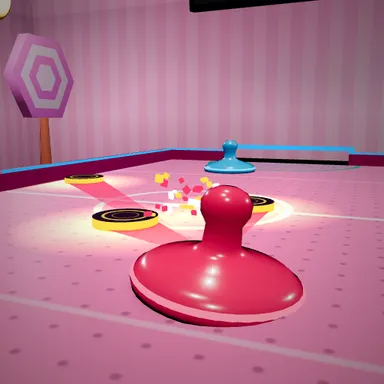
Triple Puck Frenzy throws three pucks onto the table at once and gives you ninety seconds to score as many goals as you can. The table sits in a pastel candy fair, surrounded by giant lollipops, cupcakes, birthday cakes and balloons, and the goal slots are wider than usual so the action never stops. With three pucks skating around, they collide with each other, ricochet off the rails and come at you from different angles, so you have to decide which one to block and which one to attack. A puck that goes in respawns at the centre a moment later and drifts toward the side that just conceded, keeping the pressure on both players. The clock and the score are always on the big board above the far goal. When the buzzer sounds, the player with more goals takes the win; if it is level, the next goal decides everything in sudden death. Play against a friendly CPU that keeps the rally fun, raise it to Medium or Hard when you want a real fight, or pick two players and share one screen for a hilarious party match. It is quick, loud and perfect for a short break.
How to play
Drive your mallet with the mouse, a finger, WASD or the arrow keys. Three pucks are in play: block the dangerous ones and smash the rest into the wide goal. Most goals after ninety seconds wins; a tie goes to sudden death.
Controls
| Mouse | Move |
| Drag | Move |
| W A S D | Move |
| Arrow keys | Move |
📺 Play on a TV or projector
- Laptop or PC: connect it to the TV or projector with an HDMI cable (or cast the Chrome tab / mirror your screen), then press the fullscreen button.
- Android TV, Google TV or a TV box: open this site in a browser app on the TV (any Chromium-based TV browser works) and pick a game with the remote's arrows and OK.
- Gamepad: pair a Bluetooth controller (Xbox, PlayStation or a generic one) or plug in a USB one. Stick or D-pad moves, Ⓐ/✕ jumps and selects, Start pauses, View/Select switches fullscreen. In point-and-click games the right stick moves a pointer and RT clicks.
- Phone or tablet: mirror or cast your screen to the TV, or open the site in the TV's own browser.
Difficulty: ★★☆☆☆ · Released: 2026-10-07