
About Lava Rush Rumble
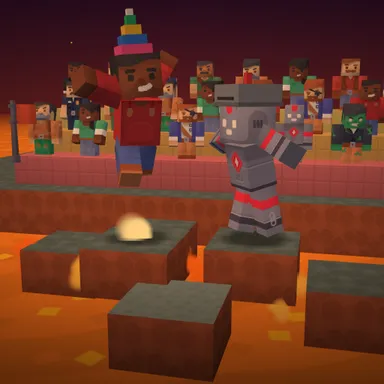
Lava Rush Rumble drops the Noob and the Pro into a volcano where the ground is never safe for long. Five fast rounds, every one played above glowing lava under a smoky orange sky. On the Lava Floor, tiles flash, shake and sink one after another, so you hop gaps, dodge your rival's shoves and try to be the last fighter standing; the melt gets faster the longer you survive. The Block Hop Dash is a side-view sprint along two lanes of basalt blocks with wide gaps, spikes and springs, and one missed jump drops you back to the last safe block. Tile Grab turns a hot checkerboard into a land war: claim tiles by running over them, stomp to grab a whole patch, and snatch the golden tiles for a big swing. A sumo showdown on a shrinking slab rounds things off. Play solo against an AI on Easy, Normal or Pro, or squeeze two players on one device with W A S D plus F against the arrow keys plus L; on touch screens each player owns half of the display. Screens shake, embers fly, and every finish happens in slow motion. Play online too: quick match or invite a friend, and the AI covers anyone who drops.
How to play
Player 1 (Noob, blue): W A S D + F. Player 2 (Pro, red): arrow keys + L. Alone, pick 1 Player (W A S D or arrows, F or Space). Lava Floor: move and press the action key to jump gaps. Block Hop Dash: you run by yourself; right sprints, left brakes, up or the action key jumps. Tile Grab: run over tiles to claim them, the action key stomps a 3x3 patch. Sumo Shove: the action key shoves. On a phone, 1 Player has a stick and a button; in 2 Players each half is one player. Most stars wins. Online: you play one fighter, Noob or Pro, with either key set, the mouse (drag to move, right-click to act) or the touch stick; the AI covers anyone who leaves.
Controls
| WASDF | Move |
| ←↑↓→L | Move |
📺 Play on a TV or projector
- Laptop or PC: connect it to the TV or projector with an HDMI cable (or cast the Chrome tab / mirror your screen), then press the fullscreen button.
- Android TV, Google TV or a TV box: open this site in a browser app on the TV (any Chromium-based TV browser works) and pick a game with the remote's arrows and OK.
- Gamepad: pair a Bluetooth controller (Xbox, PlayStation or a generic one) or plug in a USB one. Stick or D-pad moves, Ⓐ/✕ jumps and selects, Start pauses, View/Select switches fullscreen. In point-and-click games the right stick moves a pointer and RT clicks.
- Phone or tablet: mirror or cast your screen to the TV, or open the site in the TV's own browser.
Difficulty: ★★★★☆ · Released: 2026-10-08