
About Lucky Lanes Bowling
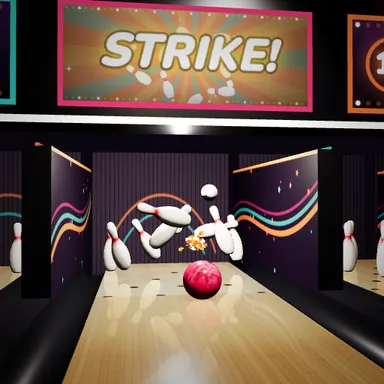
Lucky Lanes Bowling is a full ten-frame game on a gleaming maple lane in a retro alley, with purple walls, orange neon, overhead score monitors and the clatter of the neighbouring lanes around you. Step up to the foul line, slide sideways to pick your board, then swipe up from the ball to send it rolling: the direction of your swipe sets the line, its speed sets the pace, and a curved swipe or the hook slider adds spin so the ball breaks late toward the pocket. The pins are simulated one by one, so a flush pocket hit sends them crashing into each other for a strike, a head-on hit can leave a nasty split and a light touch might only clip the corner. Scoring follows the real rules, with strikes counting the next two balls, spares the next one and up to three balls in the tenth frame, and the classic score sheet fills in at the top of the screen. Bowl solo to chase a high score, take on Rookie Ray, League Lou or Pro Penny, pass the device to a friend for a two-player game, or go online. Strikes trigger cheers, confetti and the pin cam; doubles and turkeys get their own call. Online, Quick Match, a private room or a friend invite seats two to four bowlers on one lane: the host picks a five- or ten-frame match, everybody takes their frame in turn while the others watch every throw live, and the shared score sheet fills in for the whole table. Empty lanes simply wait for friends until someone presses Start with AI; if a player drops out or sits idle for twenty seconds the CPU bowls for them, and the highest score wins and earns points.
How to play
Drag sideways to choose where you stand, then swipe up from the ball to bowl. Swipe direction is your line, swipe speed is your power, and a curved swipe or the hook slider adds spin. Keyboard: arrows move, A and D aim, Q and E hook, hold Space and release. Online: pick Quick Match, a room or a friend invite on the game page. The host chooses 5 or 10 frames in the waiting room; press Start with AI to fill empty lanes with CPU bowlers. When it is not your turn you watch the others bowl live; tap the leaderboard (or press S) for the full score sheet.
Controls
| Drag | Throw |
| Arrow keys | Move |
| Space | Throw |
📺 Play on a TV or projector
- Laptop or PC: connect it to the TV or projector with an HDMI cable (or cast the Chrome tab / mirror your screen), then press the fullscreen button.
- Android TV, Google TV or a TV box: open this site in a browser app on the TV (any Chromium-based TV browser works) and pick a game with the remote's arrows and OK.
- Gamepad: pair a Bluetooth controller (Xbox, PlayStation or a generic one) or plug in a USB one. Stick or D-pad moves, Ⓐ/✕ jumps and selects, Start pauses, View/Select switches fullscreen. In point-and-click games the right stick moves a pointer and RT clicks.
- Phone or tablet: mirror or cast your screen to the TV, or open the site in the TV's own browser.
Difficulty: ★★☆☆☆ · Released: 2026-10-07