
About Bakery Street Tycoon
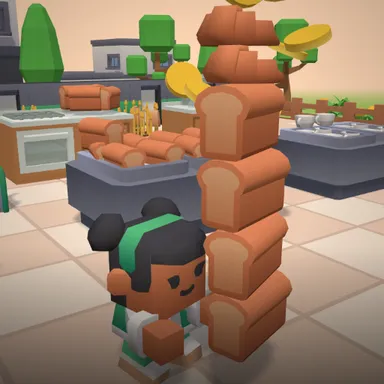
Bakery Street Tycoon is a cosy corner bakery where every treat starts as a sack of flour. A golden wheat field stretches across the back of the lot; fill your arms with flour, carry it to the ovens and they bake it into crusty loaves, flaky croissants, sprinkled donuts, cupcakes and towering birthday cakes. The coffee machine brews on its own, but everything else needs a steady supply of flour, so you are always juggling: feed the ovens, carry fresh pastries to the glass counters, serve the queue and scoop up your earnings before the next rush. Unlock new ovens one at a time, upgrade how much you can carry and how fast you walk, then hire a cashier and a crew of busy cat bakers who keep the ovens fed and the counters full while you plan the next purchase. A bouncing arrow shows where to go next, and a progress bar tracks how close the shop is to finished. Complete every unlock to open a bigger bakery further down the street, with pricier treats and better profits. Progress saves automatically and the bakery keeps earning a bit while you are away.
How to play
Move with WASD / arrows, click to walk, or drag on a phone. Pick flour from the wheat field and walk to an oven to load it; walk to the oven again to collect what it baked, stock the counters, serve at the till, collect coins and stand on pads to unlock.
Controls
| W A S DArrow keys | Move |
| Mouse | Move |
📺 Play on a TV or projector
- Laptop or PC: connect it to the TV or projector with an HDMI cable (or cast the Chrome tab / mirror your screen), then press the fullscreen button.
- Android TV, Google TV or a TV box: open this site in a browser app on the TV (any Chromium-based TV browser works) and pick a game with the remote's arrows and OK.
- Gamepad: pair a Bluetooth controller (Xbox, PlayStation or a generic one) or plug in a USB one. Stick or D-pad moves, Ⓐ/✕ jumps and selects, Start pauses, View/Select switches fullscreen. In point-and-click games the right stick moves a pointer and RT clicks.
- Phone or tablet: mirror or cast your screen to the TV, or open the site in the TV's own browser.
Difficulty: ★★☆☆☆ · Released: 2026-10-07