
About Koi Sushi Counter
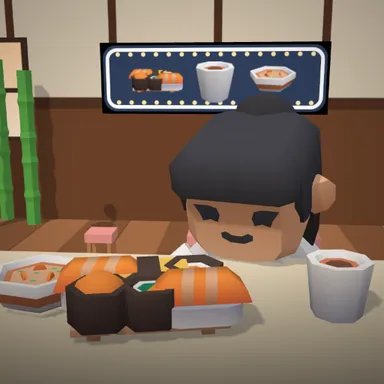
Paper lanterns glow above a calm wooden counter, bamboo sways by the windows and guests settle in for a sushi platter. Koi Sushi Counter is a cooking game about planning ahead rather than racing the heat: nothing burns here, but every piece of nigiri and maki needs a scoop of rice from the rice cooker, and the pot only makes a handful of portions per batch. Let it run empty and the whole line stalls while the next batch steams, so you keep one eye on the rice count while assembling boards of salmon nigiri, sweet egg tamago and three kinds of maki rolls. Orders grow from a couple of pieces to crowded five-piece platters, and miso soup simmers in its own pot to be ladled out bowl by bowl alongside cups of green tea. Now and then a sharp-eyed critic takes a seat, paying far more but losing patience quickly. Thirty evenings bring new rolls and bigger crowds, and the coins you collect buy bigger pots, extra boards, faster tea and a calmer room for picky diners.
How to play
Tap the rice cooker to steam a batch of rice. Tap an empty spot to set down a board, then tap the sushi trays to add pieces (each uses one rice portion). Tap a finished board, a cup of tea or the soup pot to serve. Watch the rice count so the line never stops.
Controls
| Click / Tap | Tap |
📺 Play on a TV or projector
- Laptop or PC: connect it to the TV or projector with an HDMI cable (or cast the Chrome tab / mirror your screen), then press the fullscreen button.
- Android TV, Google TV or a TV box: open this site in a browser app on the TV (any Chromium-based TV browser works) and pick a game with the remote's arrows and OK.
- Gamepad: pair a Bluetooth controller (Xbox, PlayStation or a generic one) or plug in a USB one. Stick or D-pad moves, Ⓐ/✕ jumps and selects, Start pauses, View/Select switches fullscreen. In point-and-click games the right stick moves a pointer and RT clicks.
- Phone or tablet: mirror or cast your screen to the TV, or open the site in the TV's own browser.
Difficulty: ★★★☆☆ · Released: 2026-10-08