
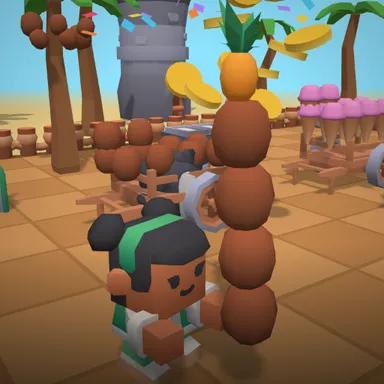
About Beach Snack Shack
Beach Snack Shack is a seaside snack bar on a wooden deck where the customers are sunburnt, thirsty and not very patient. Knock coconuts out of the palm trees, pick pineapples from the sandy patch, scoop ice cream from the freezer, pull cold sodas from the fridge and grill hot dogs and fries, then carry everything to the striped stalls. Every customer has a little timer over their head: keep their favourite snack in stock and get them through the till quickly and they leave a tip on top of the bill, but let them wait too long and they storm off with nothing. That makes every trip a small decision about what to restock first and when to run back to the register. Sailboats and speedboats drift past as the shack grows, and each new stall, upgrade and hire pops up in a shower of confetti. Penguin helpers waddle the snacks from the kitchen to the stalls and a cashier takes over the queue once you can afford one. Unlock every spot to finish the shack and open a bigger one on the next beach with better prices. Progress saves automatically and offline earnings wait for you when you come back.
How to play
Move with WASD / arrows, click the sand to walk, or drag on a phone. Brush past trees and machines to grab snacks, stock the stalls, serve fast at the till for tips, collect the coins and stand on pads to unlock. Customers leave if they wait too long.
Controls
| W A S DArrow keys | Move |
| Mouse | Move |
📺 Play on a TV or projector
- Laptop or PC: connect it to the TV or projector with an HDMI cable (or cast the Chrome tab / mirror your screen), then press the fullscreen button.
- Android TV, Google TV or a TV box: open this site in a browser app on the TV (any Chromium-based TV browser works) and pick a game with the remote's arrows and OK.
- Gamepad: pair a Bluetooth controller (Xbox, PlayStation or a generic one) or plug in a USB one. Stick or D-pad moves, Ⓐ/✕ jumps and selects, Start pauses, View/Select switches fullscreen. In point-and-click games the right stick moves a pointer and RT clicks.
- Phone or tablet: mirror or cast your screen to the TV, or open the site in the TV's own browser.
Difficulty: ★★★☆☆ · Released: 2026-10-07