
About Frost Fort Duel
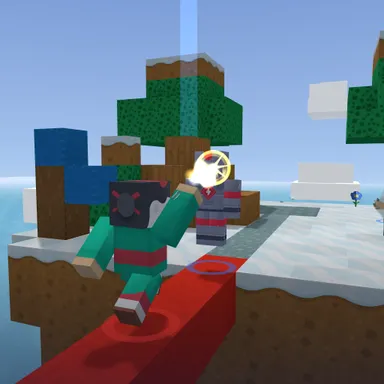
Frost Fort Duel is a one-on-one siege across a frozen sky. Pick your look from 17 blocky heroes, then duel a bot or go online with Quick Match, a private room or an invite for friends, with CPU fighters filling empty seats. Two snowy islands face each other over icy water, and each bed starts the match already locked inside a fortress of wool and wooden planks. You begin with an iron sword and a full stack of wool, so the race is on from the very first second: bridge across fast, or stay home and thicken your walls? The centre island is ringed with slippery ice that sends careless fighters sliding toward the edge, so time your swings and keep your footing. Breaking into a fortified bed takes patience. Mine through the planks first, slip past the wool layer and swing at the pillow before your opponent rushes back to defend. Pickaxes make every wall crumble faster, emeralds from the centre buy diamond swords, and a golden apple can turn a losing duel around. Your rival is a single bot that learns new tricks as you climb thirty duels, from cautious builder to fearless raider who strafes, jumps for critical hits and bridges straight at you. The frozen sky has more than one battlefield: a glittering diamond island, a moonlit night duel lit by lanterns and marathon duels where the bridge stretches across tiny stepping-stone islands. Win with your own fort intact and under par time to collect all three stars.
How to play
Move with WASD, the arrow keys or the touch stick. Hold right-click, Ctrl+click, Shift or K (▦ on touch) while walking to bridge, or stand still to stack walls; on touch, pushing the stick off an edge with wool bridges by itself. Left-click or hold J (⚔ on touch) to fight and to mine walls and beds. Space (▲ on touch) jumps (falling hits crit), F throws a fireball, E eats a golden apple (tap those hotbar slots on touch). Shop with 1–9, a click or a tap. Ice is slippery! Pick one of 17 heroes before a match; for online play, use Quick Match, a room or a friend invite.
Controls
| W A S D | Move |
| JMouse | Hit |
| ShiftKRMB | Build |
| Space | Jump |
| F | Throw |
📺 Play on a TV or projector
- Laptop or PC: connect it to the TV or projector with an HDMI cable (or cast the Chrome tab / mirror your screen), then press the fullscreen button.
- Android TV, Google TV or a TV box: open this site in a browser app on the TV (any Chromium-based TV browser works) and pick a game with the remote's arrows and OK.
- Gamepad: pair a Bluetooth controller (Xbox, PlayStation or a generic one) or plug in a USB one. Stick or D-pad moves, Ⓐ/✕ jumps and selects, Start pauses, View/Select switches fullscreen. In point-and-click games the right stick moves a pointer and RT clicks.
- Phone or tablet: mirror or cast your screen to the TV, or open the site in the TV's own browser.
Difficulty: ★★★★☆ · Released: 2026-10-08