
About Neon Night Snakes
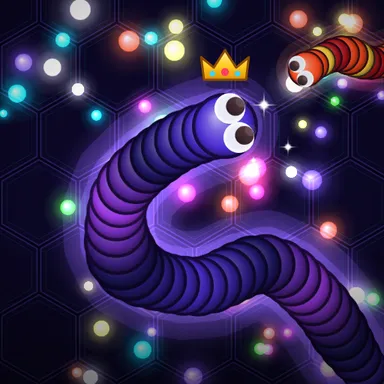
Neon Night Snakes switches off the lights. The arena is a black hexagon grid lit only by electric orbs and the glowing bodies of the snakes themselves, and your own light reaches just a short way around your head. Out in the dark you see rivals as bright neon outlines and burning heads sliding through the shadows, which looks beautiful and feels dangerous, because a huge snake can be coiled just beyond the edge of your glow. Every snake shines with its own colour: pink, cyan, acid green and gold trails cross the darkness, and boosting sends a pulse of light racing down the body. Your glow grows as you grow, so a long snake sees further and can plan bolder cuts. Magnet bubbles pull orbs in from the dark and ghost bubbles let you glide through bodies for a few seconds, perfect for escaping a closing circle. The rules are the endless classics: eat to grow, make rivals hit your body, never touch theirs with your head and climb the leaderboard as far as you dare. Choose a skin that pops in the dark and hunt by the light of the neon. Bring friends into the dark: Quick Match, private rooms and friend invites put up to six real players in the same neon night, the AI plays any empty seat and the usual bots keep it crowded. Online rounds last a few minutes, you respawn small after a crash, and the longest snake at the bell earns the points on the final leaderboard.
How to play
Steer with the mouse or stick and hold click, Space or the lightning button to boost. Your light only reaches a short distance, so watch for neon outlines in the dark. Eat orbs, grow, and make rivals crash into you. Online: use Quick Match, a room or a friend invite on the game page. Up to six players per arena, a round lasts a few minutes, and you respawn when you are eaten.
Controls
| Mouse | Steer |
| Click / TapSpace | Boost |
| Arrow keys | Steer |
📺 Play on a TV or projector
- Laptop or PC: connect it to the TV or projector with an HDMI cable (or cast the Chrome tab / mirror your screen), then press the fullscreen button.
- Android TV, Google TV or a TV box: open this site in a browser app on the TV (any Chromium-based TV browser works) and pick a game with the remote's arrows and OK.
- Gamepad: pair a Bluetooth controller (Xbox, PlayStation or a generic one) or plug in a USB one. Stick or D-pad moves, Ⓐ/✕ jumps and selects, Start pauses, View/Select switches fullscreen. In point-and-click games the right stick moves a pointer and RT clicks.
- Phone or tablet: mirror or cast your screen to the TV, or open the site in the TV's own browser.
Difficulty: ★★★☆☆ · Released: 2026-10-07