
About Ice Floe Shove
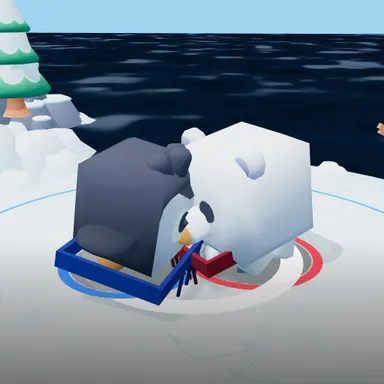
Ice Floe Shove moves the sumo ring onto a slippery slab of sea ice floating in the arctic, and nothing stays where you put it. A brave penguin faces a hulking polar bear while penguin fans cheer from the drifting chunks around them. The ice is so smooth that every push keeps sliding long after you let go, collisions are extra bouncy, and charging is slower to recharge, so the whole fight becomes a careful dance of momentum: start a slide too early and you will glide straight off the edge on your own. Worse, the floe is melting. The glowing blue edge of the ring creeps inward every second of a round, from a roomy circle to a cramped little platform, so a cautious opponent cannot simply wait you out. Brake by pushing against your own slide, bait your rival into over-committing, then nudge them over the cracking rim for a frosty splash. Play the computer on easy, medium or hard, or challenge a friend on the same keyboard or phone. First to three rounds is the champion of the floe. Online, up to four players slide around the shrinking floe at once: quick match or invite friends, last wrestler on the ice takes the round, and the computer plays any empty seat. Win two rounds to rule the floe.
How to play
Push with WASD or the arrow keys (hold the mouse or drag the stick on touch screens) and charge with Space, Enter or the ⚡ button. The ice keeps you sliding and the ring shrinks every round: the last wrestler on the ice wins the round. Offline, pick VS CPU or 2 PLAYERS (P1: WASD + Space, P2: arrows + Enter; on one touch screen each player drags on their own half and flicks to charge). Online: up to 4 players, first to 2 rounds wins, and the computer plays empty seats.
Controls
| W A S D | Move |
| Space | Dash |
| Drag | Move |
📺 Play on a TV or projector
- Laptop or PC: connect it to the TV or projector with an HDMI cable (or cast the Chrome tab / mirror your screen), then press the fullscreen button.
- Android TV, Google TV or a TV box: open this site in a browser app on the TV (any Chromium-based TV browser works) and pick a game with the remote's arrows and OK.
- Gamepad: pair a Bluetooth controller (Xbox, PlayStation or a generic one) or plug in a USB one. Stick or D-pad moves, Ⓐ/✕ jumps and selects, Start pauses, View/Select switches fullscreen. In point-and-click games the right stick moves a pointer and RT clicks.
- Phone or tablet: mirror or cast your screen to the TV, or open the site in the TV's own browser.
Difficulty: ★★★☆☆ · Released: 2026-10-08