
About Sinkhole Showdown
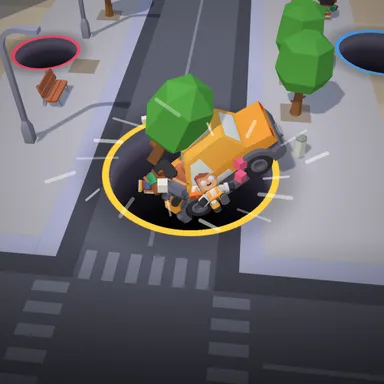
Sinkhole Showdown drops you into a sunny low-poly city as a tiny black hole in the pavement, with six rival holes already prowling the streets and only two minutes on the clock. Glide under traffic cones, fire hydrants and strolling pedestrians and watch them tip over the rim and tumble into the dark. Every gulp makes you wider, the camera pulls back with each level, and soon benches, park trees and parked cars are fair game. Keep growing and whole buses, cottages, office blocks and finally the glass skyscraper in the middle of downtown lean over the edge and sink out of sight with a satisfying rumble. The rivals are hungry too. A live leaderboard shows who is ahead, name tags turn red when a hole is big enough to swallow you and green when you can swallow it, and getting caught sends you back to the start as a pinhole. When the timer hits zero the three biggest holes climb the podium. You can also go online: hit Quick Match, open a room or invite friends and share one city with up to six real players, with AI holes filling any empty seat and the six rivals still prowling. Everyone gets the same two-minute round on a fresh city, a swallowed hole respawns as a pinhole, and the final leaderboard ranks everyone by size so the biggest players earn points. Steer with the mouse, WASD or the arrow keys, or drag anywhere on a phone, and see how much of the city you can make disappear.
How to play
Steer your hole with the mouse, WASD / arrow keys, or drag on a phone. Swallow anything smaller than you to grow, avoid holes with red names, eat holes with green names, and be the biggest when the 2-minute timer ends. Online: pick Quick Match, create a room or invite friends from the game page; up to 6 players share the city and AI holes fill empty seats.
Controls
| Mouse | Steer |
| W A S DArrow keys | Move |
| Drag | Move |
📺 Play on a TV or projector
- Laptop or PC: connect it to the TV or projector with an HDMI cable (or cast the Chrome tab / mirror your screen), then press the fullscreen button.
- Android TV, Google TV or a TV box: open this site in a browser app on the TV (any Chromium-based TV browser works) and pick a game with the remote's arrows and OK.
- Gamepad: pair a Bluetooth controller (Xbox, PlayStation or a generic one) or plug in a USB one. Stick or D-pad moves, Ⓐ/✕ jumps and selects, Start pauses, View/Select switches fullscreen. In point-and-click games the right stick moves a pointer and RT clicks.
- Phone or tablet: mirror or cast your screen to the TV, or open the site in the TV's own browser.
Difficulty: ★★☆☆☆ · Released: 2026-10-06