
About Molehill Mayhem
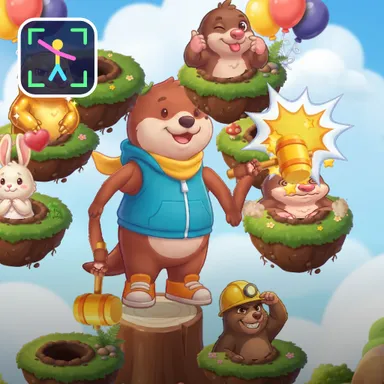
Molehill Mayhem is a sky garden full of cheeky moles, and your own two hands are the mallets. Turn on the camera and you appear in the middle of the garden as Pip the otter standing on a tree stump, a toy mallet in each paw, mirrored like a selfie so it moves exactly when you move. Eight little grassy islands float around you, placed within reach of your real arms after a moment of calibration. A mole pops out of a burrow, you swing your hand at that spot, and BONK: it squashes flat, sees stars and pops your score. Moles come out on the beat, wave after wave, and every wave is a little faster. Golden moles are worth triple points, helmet moles need a CLANG before the BONK, and bunnies sometimes peek out too, so leave them alone or lose your combo. Sky moles float up on balloons above your head, so jump to reach them for a super bonk, and low moles hide by your knees, so squat down to get them. Keep bonking without a miss and your combo multiplier climbs all the way to times four. At the end the King Mole arrives with his crown and cape, hopping from hole to hole: bonk him twelve times to win the show. Earn stars to unlock new mallets, from a squeaky hammer to a frying pan and a rubber duck. Two kids can play side by side on one camera with two gardens, or race friends online. Only your movements are used and the picture stays on your device. No camera? Play with the keyboard, a gamepad, a TV remote or by tapping the moles.
How to play
Choose Play with my body and stand two to three metres from the camera so it sees your whole body. Hold still for a second while the garden is measured to your arms, then swing a hand at any mole that pops up. Jump for the moles on balloons above your head, squat for the moles beside your knees, never bonk the bunnies, and give helmet moles two bonks. Keys: 1, Q, A and Z bonk the left blocks from top to bottom, 0, O, L and M the right ones; arrows and Enter move and bonk; or tap the moles. Two players: 2 players, one camera. Online: Quick Match, Create room or Invite on the game page.
Controls
| 1QAZ | Hit |
| 0OLM | Hit |
| Arrow keys | Move |
| EnterSpace | Hit |
📺 Play on a TV or projector
- Laptop or PC: connect it to the TV or projector with an HDMI cable (or cast the Chrome tab / mirror your screen), then press the fullscreen button.
- Android TV, Google TV or a TV box: open this site in a browser app on the TV (any Chromium-based TV browser works) and pick a game with the remote's arrows and OK.
- Gamepad: pair a Bluetooth controller (Xbox, PlayStation or a generic one) or plug in a USB one. Stick or D-pad moves, Ⓐ/✕ jumps and selects, Start pauses, View/Select switches fullscreen. In point-and-click games the right stick moves a pointer and RT clicks.
- Phone or tablet: mirror or cast your screen to the TV, or open the site in the TV's own browser.
Difficulty: ★☆☆☆☆ · Released: 2026-10-13