
About Island Sumo Party
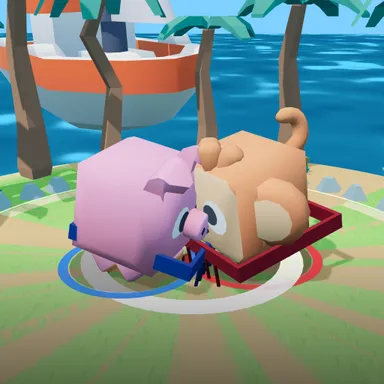
Island Sumo Party is the quickest way to settle an argument with a friend. A round grassy ring sits on top of a tiny tropical island, palm trees sway on the rim, parrots, crabs and monkeys cheer from the neighbouring islets, and the only rule is simple: whoever falls into the turquoise sea loses the round. Play against the computer with three difficulty settings, from a relaxed easy rival that charges blindly to a hard one that reads your movement and counter-charges, or hand the other side of the keyboard or phone to a friend for a proper same-device duel. Player one pushes with WASD and charges with Space while player two uses the arrow keys and Enter; on a touch screen each player simply drags a finger on their own half of the screen and flicks to charge. Collisions are pure bouncy physics, so a well-timed charge into a rival who is already moving toward the edge sends them flying with a huge splash. First to three rounds wins the match. Matches take about a minute, which makes it perfect for quick rematches, family game nights and settling who really is the island champion. Want a bigger party? Play online: use quick match or invite friends and up to four wrestlers share the ring in a free-for-all. Everyone who falls in the sea is out, the last wrestler standing takes the round, and the computer plays any empty seat, so a match always starts. Win three rounds to be the champion.
How to play
Push with WASD or the arrow keys (hold the mouse or drag the stick on touch screens) and charge with Space, Enter or the ⚡ button. Knock your rivals into the sea: the last wrestler in the ring wins the round. Offline, pick VS CPU or 2 PLAYERS (P1: WASD + Space, P2: arrows + Enter; on one touch screen each player drags on their own half and flicks to charge). Online: up to 4 players, first to 3 rounds wins, and the computer plays empty seats.
Controls
| W A S D | Move |
| Space | Dash |
| Drag | Move |
📺 Play on a TV or projector
- Laptop or PC: connect it to the TV or projector with an HDMI cable (or cast the Chrome tab / mirror your screen), then press the fullscreen button.
- Android TV, Google TV or a TV box: open this site in a browser app on the TV (any Chromium-based TV browser works) and pick a game with the remote's arrows and OK.
- Gamepad: pair a Bluetooth controller (Xbox, PlayStation or a generic one) or plug in a USB one. Stick or D-pad moves, Ⓐ/✕ jumps and selects, Start pauses, View/Select switches fullscreen. In point-and-click games the right stick moves a pointer and RT clicks.
- Phone or tablet: mirror or cast your screen to the TV, or open the site in the TV's own browser.
Difficulty: ★☆☆☆☆ · Released: 2026-10-08