
About Snowfield Penalty Duel
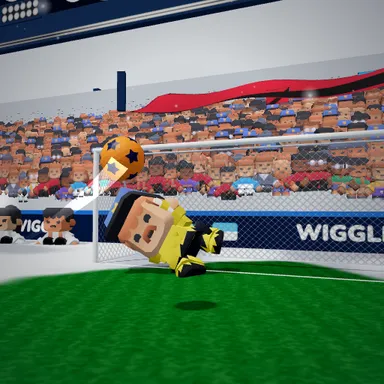
Snowfield Penalty Duel is a two-player shoot-out for one screen and two sets of thumbs. Snow drifts down over a frosty stadium, the orange winter ball glows against the white, and the fans of the crimson Rubrikk and the sky-blue Azuria have packed every seat to see who holds their nerve. Player one takes the first kick while player two pulls on the gloves, then the roles swap after every shot. The kicker swipes from the ball toward a corner, curving the swipe to bend it and speeding it up for extra pace, while the keeper waits until the run-up and taps the spot in the goal where they want to throw themselves. A little slow motion as the ball leaves the boot gives the goalkeeper a fair chance to react, but guess too early and a sharp kicker will roll it the other way. Five kicks each decide the duel; level after that and it becomes sudden death until someone cracks. On a keyboard the keeper can dive with the arrow keys while the kicker uses the mouse. Play it online too: Quick Match, a private room or a friend invite pairs you with a real opponent for a best-of-five shoot-out, then sudden death. Both players lock in at the same time, the shooter's aim and power against the keeper's dive, and nobody sees the other's choice until both are in. If your opponent drops out the CPU takes the seat, and the winner earns points.
How to play
Take turns: the kicker swipes from the ball to shoot, the keeper taps the goal to dive (keyboard: arrow keys). Five kicks each, then sudden death. Online: use Quick Match, a room or a friend invite on the game page. Every kick the shooter swipes and the keeper taps the goal to pick a dive; both lock in at once, then the kick plays out. Best of five, then sudden death.
Controls
| Drag | Kick |
| Click / Tap | Block |
| Arrow keys | Aim |
| Space | Shoot |
📺 Play on a TV or projector
- Laptop or PC: connect it to the TV or projector with an HDMI cable (or cast the Chrome tab / mirror your screen), then press the fullscreen button.
- Android TV, Google TV or a TV box: open this site in a browser app on the TV (any Chromium-based TV browser works) and pick a game with the remote's arrows and OK.
- Gamepad: pair a Bluetooth controller (Xbox, PlayStation or a generic one) or plug in a USB one. Stick or D-pad moves, Ⓐ/✕ jumps and selects, Start pauses, View/Select switches fullscreen. In point-and-click games the right stick moves a pointer and RT clicks.
- Phone or tablet: mirror or cast your screen to the TV, or open the site in the TV's own browser.
Difficulty: ★★☆☆☆ · Released: 2026-10-07