
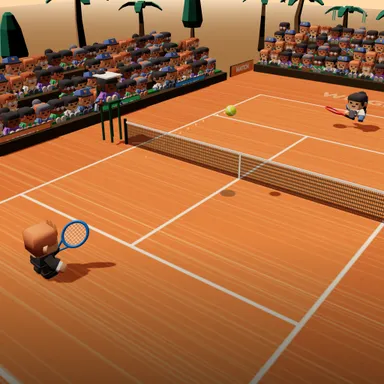
About Clay Court Clash
Clay Court Clash is a head-to-head tennis match on warm orange clay, made for quick duels against the computer or a friend sitting next to you. The red dust puffs up on every bounce, palm trees sway behind the stands and the umpire watches from a tall green chair at the net. Pick VS CPU and choose easy, medium or hard: an easy opponent jogs slowly and sometimes whiffs, a hard one anticipates your shots and sends the ball to the corner you just left. Or pick two players and share the device. Player one runs with WASD and player two with the arrow keys, the camera switches to a broadcast side view so both of you see the whole court, and on a phone each player simply drags a finger on their own side. Swings happen automatically, so the duel is all about footwork, angles and timing: meet the ball out in front for a stronger shot, hold a direction as you hit to choose the corner, and watch the landing marker to read the bounce. Matches are first to three games with full deuce and advantage scoring, about two or three minutes of back-and-forth rallies. Want a rival who is not sitting next to you? Play online: Quick Match, a private room or a friend invite puts you into a one-on-one match against a real opponent anywhere. Both players run their own athlete and see the court from their own baseline, the AI plays any empty or dropped seat, a lost connection can be rejoined mid-match, and the winner of the first-to-three-games match earns points for the leaderboard.
How to play
Choose VS CPU and a difficulty, or 2 PLAYERS. Player 1 runs with WASD, player 2 with the arrow keys; on touch screens each player drags on their own side. Swings are automatic; hold a direction while hitting to aim. Online: pick Quick Match, Create room or Invite a friend on the game page; you always play from the bottom of your screen (WASD, arrows or drag to run).
Controls
| W A S D | Move |
| Drag | Move |
| Arrow keys | Aim |
📺 Play on a TV or projector
- Laptop or PC: connect it to the TV or projector with an HDMI cable (or cast the Chrome tab / mirror your screen), then press the fullscreen button.
- Android TV, Google TV or a TV box: open this site in a browser app on the TV (any Chromium-based TV browser works) and pick a game with the remote's arrows and OK.
- Gamepad: pair a Bluetooth controller (Xbox, PlayStation or a generic one) or plug in a USB one. Stick or D-pad moves, Ⓐ/✕ jumps and selects, Start pauses, View/Select switches fullscreen. In point-and-click games the right stick moves a pointer and RT clicks.
- Phone or tablet: mirror or cast your screen to the TV, or open the site in the TV's own browser.
Difficulty: ★★☆☆☆ · Released: 2026-10-08