
About Summit Climb Race
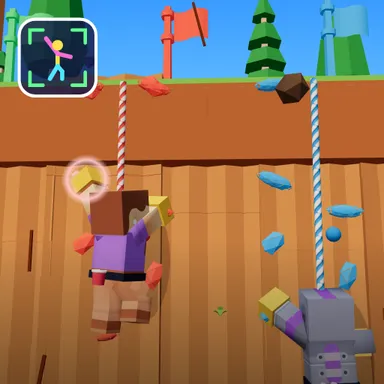
Summit Climb Race puts you on a giant sunny canyon wall, and your own arms and legs do the climbing. Turn on the camera and you appear as your blocky Wiggle Look in a harness, seen from behind, hanging on the rock with three other climbers racing up the lanes beside you. A coloured hold starts to glow above one of your shoulders. Reach that real hand up into it and your climber grabs on and pulls, and the whole cliff slides down a step. Left hand, right hand, left hand, right hand: that rhythm is climbing, and the faster you keep it the faster you fly up the wall. Every few moves a foothold lights up near your feet, so lift a knee high to step up a big stride. Watch the top of the screen too: rumbling rocks tumble down one side of the route, so lean or step to the other side and they whoosh right past you. Grab the sparkling gems on some holds, reach the checkpoint flags so a slip never drops you far, and race for the summit flag, where your climber pulls over the edge, turns around and cheers. Beat your best time, race the ghost of your best run or a friend's challenge, earn stars and unlock new climbing gloves. Two kids can race side by side on one camera with a split screen, or climb against friends online. Only your movements are used and the picture stays on your device. No camera? Climb with the arrow keys, a gamepad, a TV remote or the touch buttons.
How to play
Choose Play with my body and stand two to three metres from the camera so it sees you from head to feet. Hold still for a second, then reach the hand on the glowing hold's side up into it; alternate left and right to climb. When a foothold glows, lift a knee high. When a rock rumbles at the top, lean or step to the other side. Keys: left and right arrows (or A and D) grab with each hand, the up arrow (or W) lifts a knee, hold Q or E to lean. Two players: 2 players, one camera. Online: Quick Match, Create room or Invite on the game page.
Controls
| ←→ | Grab |
| ↑WSpace | Climb |
| QE | Lean / balance |
📺 Play on a TV or projector
- Laptop or PC: connect it to the TV or projector with an HDMI cable (or cast the Chrome tab / mirror your screen), then press the fullscreen button.
- Android TV, Google TV or a TV box: open this site in a browser app on the TV (any Chromium-based TV browser works) and pick a game with the remote's arrows and OK.
- Gamepad: pair a Bluetooth controller (Xbox, PlayStation or a generic one) or plug in a USB one. Stick or D-pad moves, Ⓐ/✕ jumps and selects, Start pauses, View/Select switches fullscreen. In point-and-click games the right stick moves a pointer and RT clicks.
- Phone or tablet: mirror or cast your screen to the TV, or open the site in the TV's own browser.
Difficulty: ★★☆☆☆ · Released: 2026-10-13