
About Wingbeat Island Race
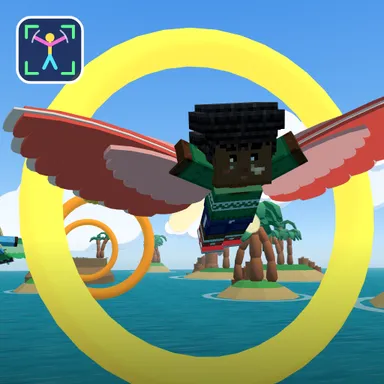
Wingbeat Island Race turns your arms into wings. Switch on your camera, step back until your arms fit when you spread them wide, and you appear on a cliff-top launch dock as your own blocky Wiggle Look, wearing a feathered glider costume with big wings strapped along both arms and a scarf streaming behind you. Flap both arms like a bird and your flyer flaps with you, copying your arms live, so every beat lifts you higher over a turquoise sea. Hold your arms out still to glide and rest, press them to your sides to dive for speed, and lean or tip your outstretched arms to bank left and right. Fly through glowing rings over palm islands and sail ships: rings in a row build a chain and every ring gives a burst of speed, while golden rings launch you forward with a big boost. Weave between tall sea stacks, duck under a rock arch, ride a tailwind tunnel, glide up a warm thermal into the floating cloud kingdom and brave a short thunderstorm before the finish arch on the beach. Bumping a rock is only a quick tumble and splashing into the sea just bounces you back up. Race three computer flyers, chase the ghost of your best flight, or go online with up to four friends. Two players on one camera fly side by side as a flock and score doubles. Your picture never leaves your device. No camera? Use the arrow keys, a gamepad or the big touch buttons.
How to play
Choose Play with my body and stand 2–3 m from the camera. Flap both arms down to climb, hold them out to glide, press them to your sides to dive, and lean or tip your arms to turn. Fly through the rings; golden rings boost you. Keys & touch: ← → turn, SPACE flap (tap fast to climb), ↓ dive. Two players: 2 players, one camera. Online: Quick Match, Create room or Invite on the game page.
Controls
| ←→ | Steer |
| Space | Climb |
| ↓ | Boost |
📺 Play on a TV or projector
- Laptop or PC: connect it to the TV or projector with an HDMI cable (or cast the Chrome tab / mirror your screen), then press the fullscreen button.
- Android TV, Google TV or a TV box: open this site in a browser app on the TV (any Chromium-based TV browser works) and pick a game with the remote's arrows and OK.
- Gamepad: pair a Bluetooth controller (Xbox, PlayStation or a generic one) or plug in a USB one. Stick or D-pad moves, Ⓐ/✕ jumps and selects, Start pauses, View/Select switches fullscreen. In point-and-click games the right stick moves a pointer and RT clicks.
- Phone or tablet: mirror or cast your screen to the TV, or open the site in the TV's own browser.
Difficulty: ★☆☆☆☆ · Released: 2026-10-13