
About Summer Night at Grandma’s
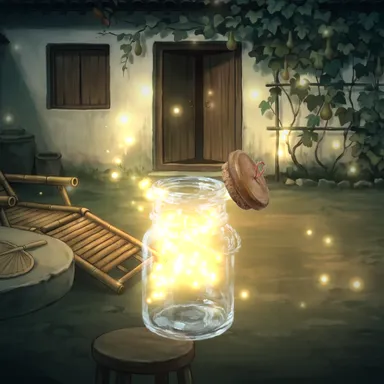
Summer Night at Grandma’s begins with a power cut in a village in the Chinese countryside. The whole place goes dark, the crickets get louder, and the air fills with fireflies flashing in time, like a slow song you can almost hear. Sit next to a friend in front of one camera. The hand on the left catches: close it around a firefly while it is lit, because a hand closing on the dark only sends them scattering. The hand on the right holds an old glass jar: open your palm and the lid comes off, make a fist and it goes back on. You will end up yelling. Open it! Close it! A firefly dropped on a closed lid bounces off, and a lid left open lets them out one by one. Every firefly in the jar takes one note of the night's tune and blinks when its turn comes, so the fuller the jar, the more of the song you hear. Its light spreads through the dark and wakes the ones asleep in the eaves and the grass. Over five nights the courtyard gives way to rice paddies with hungry frogs, a windy bamboo grove, a lotus pond with bats, and a hilltop under the Milky Way. When the song ends, the jar opens by itself and everything you caught rises into the sky. You can also play alone, or race for the fuller jar. No camera? A mouse or a finger works too.
How to play
Choose With our hands and hold up a hand each. Left hand: wait for a firefly to flash and close your hand on it; carry it to the jar and open your hand. Right hand: move the jar; an open palm takes the lid off, a fist puts it back on. Shut the lid quickly or they get out. Carry the jar into the dark to wake more. Alone, the lid opens by itself. Mouse or touch: press on a lit firefly, hold, let go over the jar; a friend on the keys moves the jar with the arrows and holds it shut with Space.
Controls
| Click / Tap | Move |
| Click / Tap | Grab |
| Arrow keys | Move |
📺 Play on a TV or projector
- Laptop or PC: connect it to the TV or projector with an HDMI cable (or cast the Chrome tab / mirror your screen), then press the fullscreen button.
- Android TV, Google TV or a TV box: open this site in a browser app on the TV (any Chromium-based TV browser works) and pick a game with the remote's arrows and OK.
- Gamepad: pair a Bluetooth controller (Xbox, PlayStation or a generic one) or plug in a USB one. Stick or D-pad moves, Ⓐ/✕ jumps and selects, Start pauses, View/Select switches fullscreen. In point-and-click games the right stick moves a pointer and RT clicks.
- Phone or tablet: mirror or cast your screen to the TV, or open the site in the TV's own browser.
Difficulty: ★★☆☆☆ · Released: 2026-11-05