
About Lantern Night
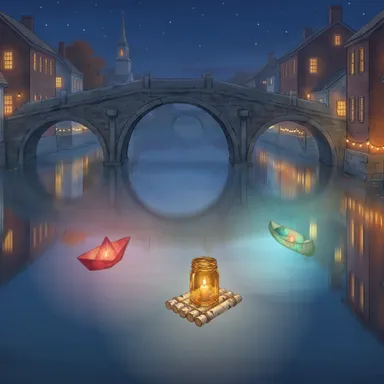
An October evening in an old New England mill town, and the whole place is waiting on you. Folks have set candle-lit paper boats and mason jars adrift at the top of the canal, and it's your job to see them safely under the old stone bridge. Raise a hand in front of your webcam and you're touching the water. Rings spread out from your palm and slap against the granite walls. Move slowly and the current bends around your fingers; shove too hard and you'll douse the flame. Three arches wait at the far end, each with a lamp that matches one kind of lantern, so you're steering, sorting and thinking two boats ahead. Get one through the right arch and a kitchen light comes on somewhere up the street while an old guitar picks out the next note of the song. String a good night together and you'll have played the whole tune, with every porch in town glowing and reflected in the canal. Five evenings get trickier, with a rowboat cutting across, gusts off the hills, a cold rain, and finally the harvest fair crowd. Grab a friend for the best of it. Sit shoulder to shoulder and share the work, or split the canal down the middle and battle: pinch to hook a lantern and haul it to your side, wrestle over the gold ones, and dump the spooky ghost lanterns on your buddy. A mouse or touchscreen works fine too. Your camera feed stays on your computer and is never recorded.
How to play
Choose With my hand and hold a hand over the water. The water pushes away from your palm and follows it when it moves. Put your palm beside a lantern, on the far side from its arch, and push it across. Each lantern goes to the arch with a lantern like it. Too rough and the flame goes out. Two friends: a hand each, together or left bank against right, where a pinch tows a lantern, gold is worth 3 and a ghost lantern costs 2. Mouse or touch: the pointer is your palm. Keys: the arrows move a palm.
Controls
| Click / Tap | Move |
| Arrow keys | Move |
📺 Play on a TV or projector
- Laptop or PC: connect it to the TV or projector with an HDMI cable (or cast the Chrome tab / mirror your screen), then press the fullscreen button.
- Android TV, Google TV or a TV box: open this site in a browser app on the TV (any Chromium-based TV browser works) and pick a game with the remote's arrows and OK.
- Gamepad: pair a Bluetooth controller (Xbox, PlayStation or a generic one) or plug in a USB one. Stick or D-pad moves, Ⓐ/✕ jumps and selects, Start pauses, View/Select switches fullscreen. In point-and-click games the right stick moves a pointer and RT clicks.
- Phone or tablet: mirror or cast your screen to the TV, or open the site in the TV's own browser.
Difficulty: ★★☆☆☆ · Released: 2026-11-05