
About Orbit Bumper Hockey
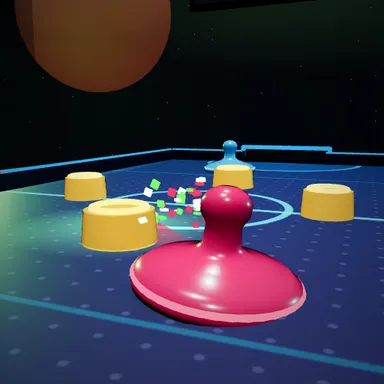
Orbit Bumper Hockey moves the game to a space station hanging over a ringed planet, where the air table is slicker, the puck is faster and four glowing bumper posts sit in a diamond around the centre line. The bumpers are lively: every hit kicks the puck away a little harder than it arrived, so a straight shot can turn into a wild rebound that crosses the table at a new angle. Learn to use them and you can bend shots around a defender, bounce the puck off a post straight into the slot or ricochet a clearance back at your opponent. The goal mouths are narrower than on a classic table, so precision matters, and with less friction a puck keeps its pace much longer. First to five goals wins. The CPU is set to Medium by default and you can switch it to Easy or Hard on the match card, or bring a friend for a two-player duel with each of you guarding one half of the table. Planets drift in the dark outside the windows, a satellite dish turns beside the court and every goal triggers a burst of light and a cheer from the crew.
How to play
Steer your mallet with the mouse, touch, WASD or the arrow keys. Use the four bumpers to bank and deflect the fast puck into the narrow goal. First to five goals wins.
Controls
| Mouse | Move |
| Drag | Move |
| W A S D | Move |
| Arrow keys | Move |
📺 Play on a TV or projector
- Laptop or PC: connect it to the TV or projector with an HDMI cable (or cast the Chrome tab / mirror your screen), then press the fullscreen button.
- Android TV, Google TV or a TV box: open this site in a browser app on the TV (any Chromium-based TV browser works) and pick a game with the remote's arrows and OK.
- Gamepad: pair a Bluetooth controller (Xbox, PlayStation or a generic one) or plug in a USB one. Stick or D-pad moves, Ⓐ/✕ jumps and selects, Start pauses, View/Select switches fullscreen. In point-and-click games the right stick moves a pointer and RT clicks.
- Phone or tablet: mirror or cast your screen to the TV, or open the site in the TV's own browser.
Difficulty: ★★★☆☆ · Released: 2026-10-07