
About Pip's Crate Crew
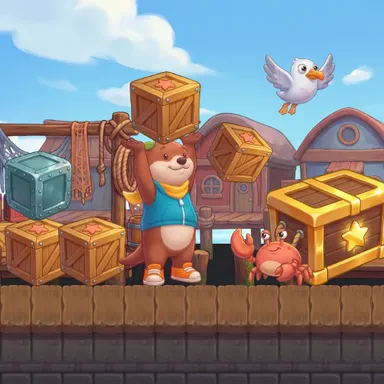
Pip's Crate Crew is a side-scrolling crate adventure along a sunny harbour, played with your whole body. Pip the otter, in his teal vest and yellow scarf, has to get through the docks, a toy workshop and the windy lighthouse cliffs, and every stage is stacked with wooden crates. Switch on the camera and step to your right to run. Squat down next to a crate and Pip lifts it high over his head; swing one arm over your head and forward, and the crate flies off to knock out snappy coral crabs, swooping seagulls and grumpy rolling barrels. Stay down in the squat and Pip hides inside the crate, so anything that bumps into him just bounces away. Some crates hide coins or a golden acorn, steel crates make steps to climb, and the big golden crates are far too heavy for one otter. With two players on one camera, both Pips share the same harbour: squat together to lift a golden crate, or pick up your friend and toss them high onto a ledge nobody could reach alone. At the end waits Big Clackjaw, a purple hermit crab living in a chipped teapot. Jumping on his teapot does nothing, but when he peeks out, puffing after a charge, a well-aimed crate bonks him. Each stage gives three stars for the gate, the golden acorns and the coins, with lantern checkpoints on the way. Online rooms play together as one crew. The picture stays on your device. No camera? Use the arrow keys, a gamepad, a TV remote or the touch buttons.
How to play
Choose Play with my body and stand two to three metres from the camera so it sees you from head to feet. Step to your right to run, stand in the middle to stop and jump for real over gaps. Squat next to a crate to lift it, stay down to hide inside it, and swing one arm over your head and forward to throw it; a quick squat puts it down. Two players: squat beside your friend to lift them and throw to toss them up high, and squat together at a golden crate. Keys: right arrow to run, up arrow to jump, down arrow to lift or hide, X to throw. Online: Quick Match, Create room or Invite.
Controls
| ←→ | Move |
| ↑ | Jump |
| ↓ | Duck |
| X | Punch |
📺 Play on a TV or projector
- Laptop or PC: connect it to the TV or projector with an HDMI cable (or cast the Chrome tab / mirror your screen), then press the fullscreen button.
- Android TV, Google TV or a TV box: open this site in a browser app on the TV (any Chromium-based TV browser works) and pick a game with the remote's arrows and OK.
- Gamepad: pair a Bluetooth controller (Xbox, PlayStation or a generic one) or plug in a USB one. Stick or D-pad moves, Ⓐ/✕ jumps and selects, Start pauses, View/Select switches fullscreen. In point-and-click games the right stick moves a pointer and RT clicks.
- Phone or tablet: mirror or cast your screen to the TV, or open the site in the TV's own browser.
Difficulty: ★★☆☆☆ · Released: 2026-10-14