
About Beat Dance Party
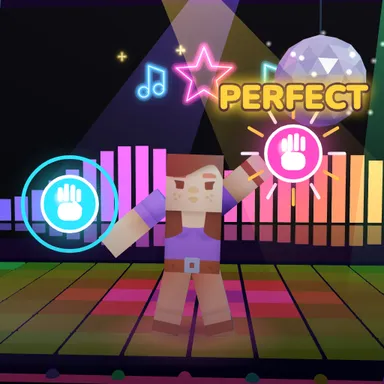
Beat Dance Party puts you in the spotlight of a glowing club stage, and your whole body is the controller. Your blocky dancer stands in the middle of the stage and copies your arms and legs as you move. Right on the beat of the music, bright cues pop up around it: a cyan orb for your left hand, a pink orb for your right hand, a golden star when it is time to clap, arrow pads on the floor for a side step, a spring pad when you should jump, and a glowing outline when it is time to strike a pose and hold it. A ring closes around every cue, and the moment it touches is the moment to move. Hit it right on time for PERFECT, a little early or late for GREAT or GOOD, and the game tells you which way you were off. Every hit in a row builds your streak and multiplies your points, and the stage lights up with you: the LED floor ripples, spotlights sweep, lasers switch on and a disco ball drops down when you are a superstar. Pick from three songs, each with an easy, normal and hard dance written by hand to the music, and do the quick timing check once so every beat feels tight on your screen. Up to four kids can dance side by side in front of one camera, each with their own dancer and score, or play with keys, touch pads or a gamepad. Collect stars on every song and beat your best score on the weekly board.
How to play
Choose Play with my body and stand back until the camera sees you from head to feet. Touch each orb with the hand of its colour (cyan = left, pink = right) when its ring closes, clap on the golden stars, step out onto the arrow pads, jump on the spring pad and copy the glowing pose until its ring fills. Keys: A or ← for the left side, S or Space for claps, jumps and poses (hold it), D or → for the right side. Do the Timing check once for the tightest timing.
Controls
| ←A | Move left |
| SpaceS | Tap |
| →D | Move right |
📺 Play on a TV or projector
- Laptop or PC: connect it to the TV or projector with an HDMI cable (or cast the Chrome tab / mirror your screen), then press the fullscreen button.
- Android TV, Google TV or a TV box: open this site in a browser app on the TV (any Chromium-based TV browser works) and pick a game with the remote's arrows and OK.
- Gamepad: pair a Bluetooth controller (Xbox, PlayStation or a generic one) or plug in a USB one. Stick or D-pad moves, Ⓐ/✕ jumps and selects, Start pauses, View/Select switches fullscreen. In point-and-click games the right stick moves a pointer and RT clicks.
- Phone or tablet: mirror or cast your screen to the TV, or open the site in the TV's own browser.
Difficulty: ★★☆☆☆ · Released: 2026-10-13