
About Forest Field Day
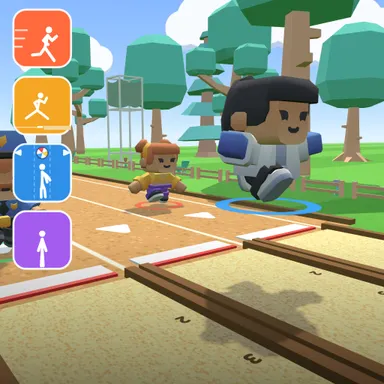
Forest Field Day moves the body controlled sports meet to a sunny clearing in the woods, with sandy lanes between the trees, a fence of logs and a soft green dodge field. It is the gentle version, made for younger children and first time camera players. The sprint is a short 40 metre dash, the computer athletes are relaxed, the ball dodge rolls fewer balls and gives more time between them, and the star jump finale is a quick twenty seconds. Every event starts with a picture card that shows the move and lets you try it first: a tick appears when the game sees you run, jump, step to the side or do a jumping jack, so even kids who cannot read yet know exactly what to do. Run on the spot to sprint, jump at the white board for the long jump, step left and right to dodge the beach balls, and finish with jumping jacks. Gold, silver and bronze medals are handed out after every event and the champion climbs the podium in the clearing. The camera picture never leaves your device and nothing is recorded. Players without a camera tap keys or touch buttons and can join the same online room. Play against friendly computer athletes or with up to three friends online.
How to play
Play with my body: step back until your head and feet fit, then try each move on the event card. Run on the spot to sprint, jump at the white board, step left or right to dodge, and do jumping jacks at the end. Keys & touch: tap SPACE or 👟 quickly to run, ↑ to jump, ← → to change lanes, and ← → in turn for star jumps. For online meets choose Quick Match, Create room or Invite on the game page, then press Start in the waiting room.
Controls
| Space | Tap |
| ↑ | Jump |
| ←→ | Move |
📺 Play on a TV or projector
- Laptop or PC: connect it to the TV or projector with an HDMI cable (or cast the Chrome tab / mirror your screen), then press the fullscreen button.
- Android TV, Google TV or a TV box: open this site in a browser app on the TV (any Chromium-based TV browser works) and pick a game with the remote's arrows and OK.
- Gamepad: pair a Bluetooth controller (Xbox, PlayStation or a generic one) or plug in a USB one. Stick or D-pad moves, Ⓐ/✕ jumps and selects, Start pauses, View/Select switches fullscreen. In point-and-click games the right stick moves a pointer and RT clicks.
- Phone or tablet: mirror or cast your screen to the TV, or open the site in the TV's own browser.
Difficulty: ★☆☆☆☆ · Released: 2026-10-09