
About Snow Fort Showdown
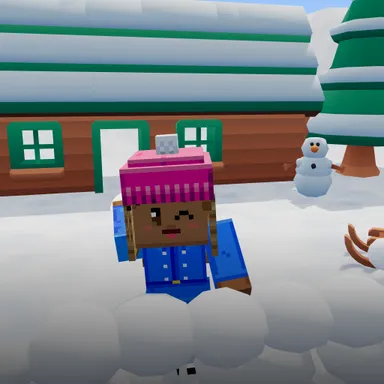
Snow Fort Showdown is a snowball fight you play with your whole body. The camera turns you into a kid behind a fort of packed snow in a sunny backyard, and the neighbour kids are hiding behind their own fort across the yard. When one of them pops up and winds up, a little warning shines over their head and a snowball comes looping toward you: lean or step aside to dodge it, or squat down behind your wall to hide. Crouching does more than keep you safe, because every moment down there scoops a fresh snowball into your pile. Then pop up and throw like a real snowball fight, arm back over your shoulder and whoosh, and your snowball flies to the kid you point at. Three hits turn a kid into a smiling snowman, and every hit on their fort knocks a chunk of snow off it, so a kid hiding behind a broken wall is easy to tag. Hit the present that slides past on a sled for a giant snowball or a triple throw. Win five yards in a row, from the backyard to the Big Kid's snow castle, where the Big Kid hurls giant snowballs you have to duck. Two players can share one camera, together in one fort against more neighbour kids or fort against fort, and online two families play two against two, each home with one camera. Nobody gets hurt: snowballs just puff into powder. The picture never leaves your device, and keys, touch or a gamepad work too.
How to play
Choose Play with my body and stand where the camera sees you from head to feet, with space around you. Lean or step left and right to dodge snowballs, squat down behind your wall to hide and to make new snowballs, then stand up and throw over your shoulder. Raise your hand to move the aim, or just throw at the kid in front of you. Keys: left and right arrows move, hold down to duck and make snow, space throws. Touch: use the arrows, hold DUCK, tap THROW.
Controls
| ←→ | Move |
| ↓ | Duck |
| Space | Shoot |
📺 Play on a TV or projector
- Laptop or PC: connect it to the TV or projector with an HDMI cable (or cast the Chrome tab / mirror your screen), then press the fullscreen button.
- Android TV, Google TV or a TV box: open this site in a browser app on the TV (any Chromium-based TV browser works) and pick a game with the remote's arrows and OK.
- Gamepad: pair a Bluetooth controller (Xbox, PlayStation or a generic one) or plug in a USB one. Stick or D-pad moves, Ⓐ/✕ jumps and selects, Start pauses, View/Select switches fullscreen. In point-and-click games the right stick moves a pointer and RT clicks.
- Phone or tablet: mirror or cast your screen to the TV, or open the site in the TV's own browser.
Difficulty: ★★☆☆☆ · Released: 2026-10-13