
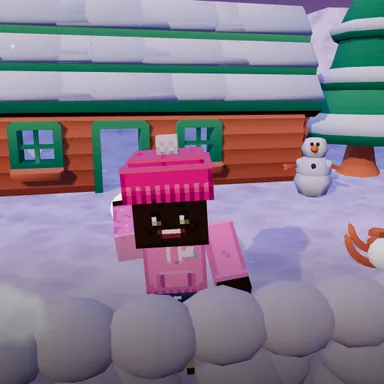
About Snowball Siege Night
Snowball Siege Night is a survival snowball fight in a lantern-lit village at dusk, played with your whole body in front of the camera. Your little snow fort stands in the middle of the square, and the village kids attack from three forts at once: two close by on the left and right and one far away by the cabin with the fairy lights. Every wave brings more of them, and they throw faster and aim better. Lean or step aside to dodge, squat behind your wall to hide and to scoop new snowballs, then stand up and throw a real overarm throw at whoever pops up. Watch the warning over a kid's head and get them while they are winding up. When their forts crack, the hiders are easy targets. Every fifth wave the Snow Giant comes, a huge kid whose giant snowballs only a duck escapes, and some of the kids throw three in a row so you have to lean the other way. You only have three hearts, but a mug of hot cocoa on the sliding present gives one back. Clear wave after wave, chain your hits for a bigger multiplier, and climb the weekly board. Snowballs just puff into powder, the picture never leaves your device, and keys, touch or a gamepad work too.
How to play
Choose Play with my body and stand where the camera sees you from head to feet, with space around you. Lean or step to dodge, squat behind your wall to hide and make snowballs, stand up and throw over your shoulder. Duck when the Snow Giant throws a giant snowball. Keys: left and right arrows move, hold down to duck and make snow, space throws. Touch: use the arrows, hold DUCK, tap THROW.
Controls
| ←→ | Move |
| ↓ | Duck |
| Space | Shoot |
📺 Play on a TV or projector
- Laptop or PC: connect it to the TV or projector with an HDMI cable (or cast the Chrome tab / mirror your screen), then press the fullscreen button.
- Android TV, Google TV or a TV box: open this site in a browser app on the TV (any Chromium-based TV browser works) and pick a game with the remote's arrows and OK.
- Gamepad: pair a Bluetooth controller (Xbox, PlayStation or a generic one) or plug in a USB one. Stick or D-pad moves, Ⓐ/✕ jumps and selects, Start pauses, View/Select switches fullscreen. In point-and-click games the right stick moves a pointer and RT clicks.
- Phone or tablet: mirror or cast your screen to the TV, or open the site in the TV's own browser.
Difficulty: ★★★☆☆ · Released: 2026-10-13