
About Neon Hands Groove
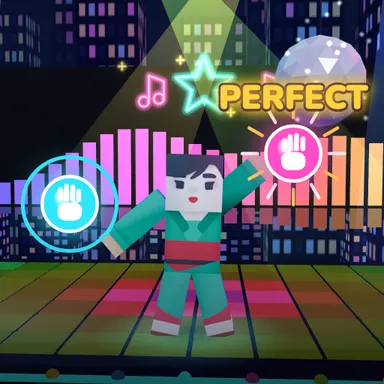
Neon Hands Groove is a dance game for your arms, played on a rooftop high above a glowing city at night. You do not need a big room: sit on the sofa, stand close to a laptop or prop up a phone, because only your head, shoulders and hands need to be in the picture. Your blocky dancer stands on the rooftop stage under string lights and copies your arms. On every beat of the music, neon cues light up around it: cyan orbs for your left hand, pink orbs for your right, golden stars to clap, and glowing outlines of fun arm poses to strike and hold, like the rocket, the airplane, the strongman and the disco point. A ring shrinks onto each cue and closes exactly on the beat you hear, so reach, sweep and clap right in time for PERFECT. The hand dances are busier than on the dance floor: crossovers over your head, quick left-right patterns and both hands at once on the harder levels. Every hit in a row grows your streak, multiplies your points and makes the city glow brighter, with lasers and a disco ball for the best streaks. Three songs with easy, normal and hard hand dances written to the music, a quick timing check, up to four dancers on one camera, and keys, touch pads or a gamepad when you just want to tap along.
How to play
Choose Play with my body and make sure the camera sees your head, shoulders and both hands — sitting is fine. Touch each orb with the hand of its colour (cyan = left, pink = right) as its ring closes, clap on the golden stars and copy the glowing arm pose until its ring fills. Keys: A or ← for the left hand, S or Space to clap and to hold a pose, D or → for the right hand.
Controls
| ←A | Move left |
| SpaceS | Tap |
| →D | Move right |
📺 Play on a TV or projector
- Laptop or PC: connect it to the TV or projector with an HDMI cable (or cast the Chrome tab / mirror your screen), then press the fullscreen button.
- Android TV, Google TV or a TV box: open this site in a browser app on the TV (any Chromium-based TV browser works) and pick a game with the remote's arrows and OK.
- Gamepad: pair a Bluetooth controller (Xbox, PlayStation or a generic one) or plug in a USB one. Stick or D-pad moves, Ⓐ/✕ jumps and selects, Start pauses, View/Select switches fullscreen. In point-and-click games the right stick moves a pointer and RT clicks.
- Phone or tablet: mirror or cast your screen to the TV, or open the site in the TV's own browser.
Difficulty: ★★☆☆☆ · Released: 2026-10-13