
About Shuttle Smash Arena
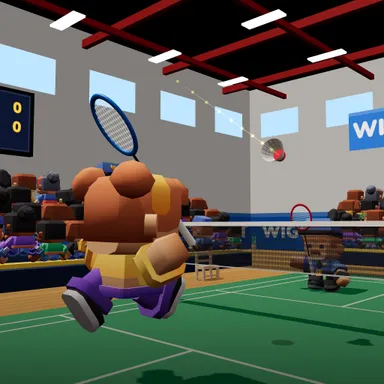
Shuttle Smash Arena puts a real badminton court in your living room, and your arm is the racket. Switch on the camera, step back until the outline says your whole body fits, and play a singles match in a busy sports hall with a cheering crowd. The shuttle flies like a real one: it leaves the racket fast, slows down in the air and drops steeply, so every shot has that true badminton feel. Reach up high and whip your arm down for a smash, swing big for a clear deep into the back court, or swing gently for a drop shot that tumbles over the net. When the shuttle comes in low, swing from below to lift it or tap a soft net shot. Jump while you smash for a jump smash and watch the slow-motion replay. The game names every shot as you hit it, shows how fast your smash was in km/h, and calls the lines IN or OUT with a mark on the floor. On Easy your player runs to the shuttle by itself and it flies a little slower, so you only have to swing; on Pro you step and lean to move. Play rally scoring to 11 against a friendly, medium or tough CPU, two players on one camera on a split screen, or online one against one. No camera? Arrows move, Z and X swing.
How to play
Choose Play with my body and stand back so your whole body fits. When the shuttle reaches the ring around your player, swing your arm: reach up high and whip down fast for a smash, a big swing for a clear, a gentle swing for a drop; swing up from below for a lift, a soft push near the net for a net shot; jump as you smash for a jump smash. Pick your racket hand and help level on the camera card (Easy: your player runs by itself). Keys: arrows move, Z = clear / lift, X = smash / drop / drive. Online: Quick Match, Create room or Invite on the game page.
Controls
| Arrow keys | Move |
| Z | Hit |
| X | Swing |
📺 Play on a TV or projector
- Laptop or PC: connect it to the TV or projector with an HDMI cable (or cast the Chrome tab / mirror your screen), then press the fullscreen button.
- Android TV, Google TV or a TV box: open this site in a browser app on the TV (any Chromium-based TV browser works) and pick a game with the remote's arrows and OK.
- Gamepad: pair a Bluetooth controller (Xbox, PlayStation or a generic one) or plug in a USB one. Stick or D-pad moves, Ⓐ/✕ jumps and selects, Start pauses, View/Select switches fullscreen. In point-and-click games the right stick moves a pointer and RT clicks.
- Phone or tablet: mirror or cast your screen to the TV, or open the site in the TV's own browser.
Difficulty: ★★☆☆☆ · Released: 2026-10-10