
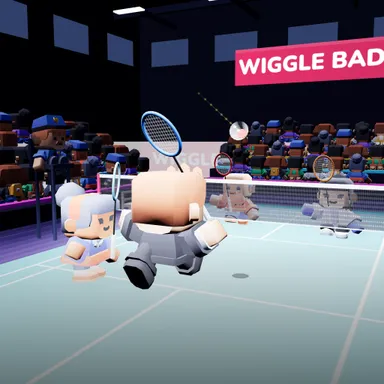
About Doubles Birdie Party
Doubles Birdie Party is badminton for two on each side, under the spotlights of a championship arena at night. You and a teammate take on a pair of CPU players, and you play it with your body: stand in front of the camera and swing your arm like a racket when the shuttle comes your way. Your teammate covers the other half of the court, so you can go for the big shots. The shuttle flies with real badminton physics, fast off the racket and then floating down, and the doubles rules are the real ones too: rally scoring to 11, short serves into the wide service court, and partners who switch sides when their team keeps the serve. Smash a high one, clear it deep, drop it short over the net, lift from below, drive it flat, and jump while you smash for a slow-motion replay. Every shot gets its name on screen, smashes show their speed, and close calls get an IN or OUT mark on the floor. Two kids in front of one camera become doubles partners: one plays the left side and one the right. Online, two players on one camera can join a room together and take on another pair. Keys work too: arrows move, Z clears and lifts, X smashes and drops.
How to play
Choose Play with my body (or 2 players, one camera to play as partners: P1 stands on the left, P2 on the right). When the shuttle reaches your ring, swing: high and fast for a smash, a big swing for a clear, gentle for a drop, from below for a lift or a net shot, sideways for a drive. Your CPU partner covers the other half. Keys: arrows move, Z = clear / lift, X = smash / drop / drive. Online 2 v 2: Quick Match, Create room or Invite; two players on one camera can join as one team.
Controls
| Arrow keys | Move |
| Z | Hit |
| X | Swing |
📺 Play on a TV or projector
- Laptop or PC: connect it to the TV or projector with an HDMI cable (or cast the Chrome tab / mirror your screen), then press the fullscreen button.
- Android TV, Google TV or a TV box: open this site in a browser app on the TV (any Chromium-based TV browser works) and pick a game with the remote's arrows and OK.
- Gamepad: pair a Bluetooth controller (Xbox, PlayStation or a generic one) or plug in a USB one. Stick or D-pad moves, Ⓐ/✕ jumps and selects, Start pauses, View/Select switches fullscreen. In point-and-click games the right stick moves a pointer and RT clicks.
- Phone or tablet: mirror or cast your screen to the TV, or open the site in the TV's own browser.
Difficulty: ★★☆☆☆ · Released: 2026-10-10