
About Forest Hop Race
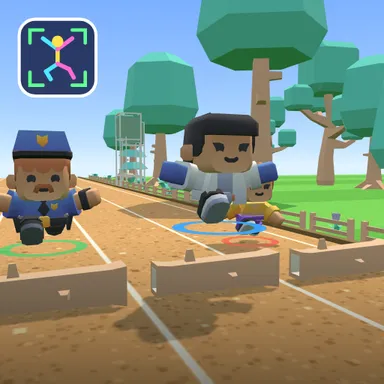
Forest Hop Race takes the body controlled sprint out of the stadium and onto a sandy trail through a sunny wood. Fallen logs lie across every lane, so hop over them, and low branches hang from posts, so squat down and slide underneath before your head bumps the leaves. Between the obstacles, long rows of golden stars float to one side of the path; step toward them (or lean your whole body) to collect each one and feel your runner surge forward. This course is a little longer, has more ducking and many more stars than the stadium, while the forest runners are gentle, which makes it a friendly first race for younger children and a great warm up for everyone else. With the camera on, the game reads only the shape of your skeleton on your own device: the picture is never recorded or uploaded. Players without a camera can tap a key or the big touch button to run and use arrows or buttons to hop, duck and lean, and they can race in the same online room as camera players. Count your hops, watch your calorie flame grow, and see who reaches the podium in the clearing first.
How to play
Play with my body: stand back until your head and feet fit the frame, run on the spot to go, hop over logs, squat under branches and step (or lean) toward the stars. Keys & touch: tap SPACE or the RUN button quickly to run, ↑ hop, ↓ squat, ← → lean. For online races choose Quick Match, Create room or Invite a friend on the game page, then press Start in the waiting room.
Controls
| Space | Tap |
| ↑ | Jump |
| ↓ | Duck |
| ←→ | Lean / balance |
📺 Play on a TV or projector
- Laptop or PC: connect it to the TV or projector with an HDMI cable (or cast the Chrome tab / mirror your screen), then press the fullscreen button.
- Android TV, Google TV or a TV box: open this site in a browser app on the TV (any Chromium-based TV browser works) and pick a game with the remote's arrows and OK.
- Gamepad: pair a Bluetooth controller (Xbox, PlayStation or a generic one) or plug in a USB one. Stick or D-pad moves, Ⓐ/✕ jumps and selects, Start pauses, View/Select switches fullscreen. In point-and-click games the right stick moves a pointer and RT clicks.
- Phone or tablet: mirror or cast your screen to the TV, or open the site in the TV's own browser.
Difficulty: ★★☆☆☆ · Released: 2026-10-09