
About Smash Speed Trainer
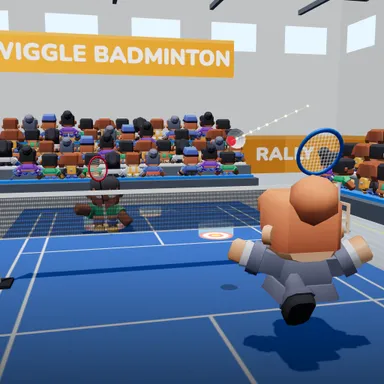
Smash Speed Trainer is a bright training gym where a shuttle machine feeds you high, floating lifts, and your only job is to smash them as hard as you can. Stand in front of the camera, reach up as the shuttle drops toward the ring around your player and whip your arm down fast. A radar reads every smash and shows its speed in km/h right away, and the faster your arm moves, the faster the shuttle flies. Glowing targets sit on the far side of the net: land a smash inside one for points, hit the bright centre for double, and the faster the smash, the bigger the bonus. Jump at the same moment you swing for a jump smash, the most powerful shot in the game, with a slow-motion replay when it lands. A round lasts sixty seconds or twenty shuttles. Your fastest smash is saved as your personal best, it can go onto the weekly board of top smashers, and you can send a friend a challenge link to beat your speed. Easy help makes your player run under every shuttle by itself, so even small kids can practise the timing, while Pro lets you do the footwork. The camera picture never leaves your device. No camera? Press X when the shuttle reaches you.
How to play
Choose Play with my body and stand back so your whole body fits. The machine lifts the shuttle to you: when it drops into the ring around your player, reach up and whip your arm down as fast as you can. Land smashes in the targets for points (the centre counts double, fast smashes earn a speed bonus); jump while you smash for a jump smash. Your fastest smash is your best and goes on the weekly board. Keys: arrows move, X smashes.
Controls
| Arrow keys | Move |
| Z | Hit |
| X | Swing |
📺 Play on a TV or projector
- Laptop or PC: connect it to the TV or projector with an HDMI cable (or cast the Chrome tab / mirror your screen), then press the fullscreen button.
- Android TV, Google TV or a TV box: open this site in a browser app on the TV (any Chromium-based TV browser works) and pick a game with the remote's arrows and OK.
- Gamepad: pair a Bluetooth controller (Xbox, PlayStation or a generic one) or plug in a USB one. Stick or D-pad moves, Ⓐ/✕ jumps and selects, Start pauses, View/Select switches fullscreen. In point-and-click games the right stick moves a pointer and RT clicks.
- Phone or tablet: mirror or cast your screen to the TV, or open the site in the TV's own browser.
Difficulty: ★☆☆☆☆ · Released: 2026-10-10