
About Snowy Skip Survival
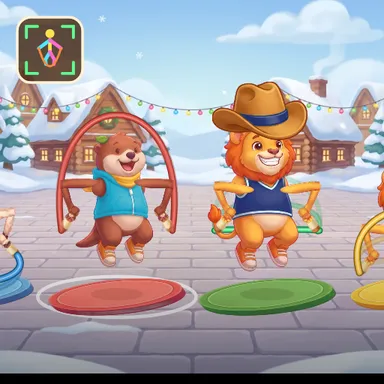
Snowy Skip Survival takes the rope battle to a snowy town square, with snowmen, twinkling lights and a stack of presents, and asks one simple question: who can keep skipping the longest? Up to four skippers stand side by side, each turning a rope of their own. The ropes start slow and gentle, so even five and six year olds can find the rhythm, and every few seconds a whistle blows and all the ropes speed up together. Trip on your rope and you lose one of three hearts, stumble for a moment, then jump straight back in; only when all your hearts are gone do you sit down in the snow and cheer on the others. The last skipper still jumping wins the round, and everybody else is ranked by how long they lasted. A ring at your feet closes exactly when your rope arrives, and a big bubble over every head shows each player's count. Play with the camera and the game follows your real hops on your own device, never recording or sending the picture, or tap the space bar or the hop button if there is no camera. Matches are short, about a minute, so a rematch is always one press away. Challenge three friendly computer skippers, or play online with friends through Quick Match, a private room or an invite link, with camera jumpers and button tappers judged by exactly the same timing.
How to play
Camera: stand back until your whole body fits, then hop every time your rope sweeps under your feet; the closing ring at your feet shows the beat. Keys or touch: press SPACE or tap HOP as the rope reaches your feet. A trip costs a heart, three trips and you are out; the last one skipping wins. For online play choose Quick Match, Create room or Invite on the game page and press Start in the waiting room when everyone is in.
Controls
| Space | Jump |
📺 Play on a TV or projector
- Laptop or PC: connect it to the TV or projector with an HDMI cable (or cast the Chrome tab / mirror your screen), then press the fullscreen button.
- Android TV, Google TV or a TV box: open this site in a browser app on the TV (any Chromium-based TV browser works) and pick a game with the remote's arrows and OK.
- Gamepad: pair a Bluetooth controller (Xbox, PlayStation or a generic one) or plug in a USB one. Stick or D-pad moves, Ⓐ/✕ jumps and selects, Start pauses, View/Select switches fullscreen. In point-and-click games the right stick moves a pointer and RT clicks.
- Phone or tablet: mirror or cast your screen to the TV, or open the site in the TV's own browser.
Difficulty: ★★☆☆☆ · Released: 2026-10-09