
About Storm Canyon Glide
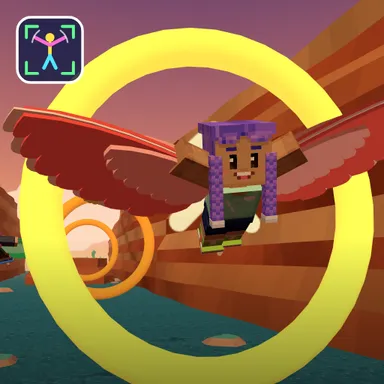
Storm Canyon Glide is an endless flight through a red-rock canyon at sunset, and your own arms are the wings. Turn on the camera, step back so your arms fit when spread, and your blocky Wiggle Look takes off from a ledge in a feathered glider suit. Flap both arms to climb, hold them out to glide, tuck them in to dive and lean to bank between the towering canyon walls. The twist is the wind meter at the top of the screen: it slowly runs out, and every ring you fly through blows it back up. Golden rings fill it a lot, sparkling gems a little, and bumping into a rock spire costs you some. When the wind is gone your flyer glides gently down to the river and the flight is over, so the question is simple: how far can you go? Every few hundred metres a storm rolls in with rain, lightning flashes, gusts that push you sideways and dark thunder clouds to steer around, followed by calm air again. The canyon gets twistier and the rings smaller the further you fly, while warm thermals let you rest and rise for free. Your best distance is marked in the sky, the weekly board shows the furthest flyers, and two players on one camera can fly as a flock sharing one meter. Only your movements are counted; the picture stays on your device. Keys, gamepad and touch work too.
How to play
Choose Play with my body and stand 2–3 m from the camera. Flap both arms to climb, hold them out to glide, tuck them in to dive and lean to turn. Fly through rings to keep the wind meter full; when it runs out the flight ends. Keys & touch: ← → turn, SPACE flap, ↓ dive. Two players: 2 players, one camera. Online: Quick Match, Create room or Invite.
Controls
| ←→ | Steer |
| Space | Climb |
| ↓ | Boost |
📺 Play on a TV or projector
- Laptop or PC: connect it to the TV or projector with an HDMI cable (or cast the Chrome tab / mirror your screen), then press the fullscreen button.
- Android TV, Google TV or a TV box: open this site in a browser app on the TV (any Chromium-based TV browser works) and pick a game with the remote's arrows and OK.
- Gamepad: pair a Bluetooth controller (Xbox, PlayStation or a generic one) or plug in a USB one. Stick or D-pad moves, Ⓐ/✕ jumps and selects, Start pauses, View/Select switches fullscreen. In point-and-click games the right stick moves a pointer and RT clicks.
- Phone or tablet: mirror or cast your screen to the TV, or open the site in the TV's own browser.
Difficulty: ★★☆☆☆ · Released: 2026-10-13